1. Create an AML Embedding
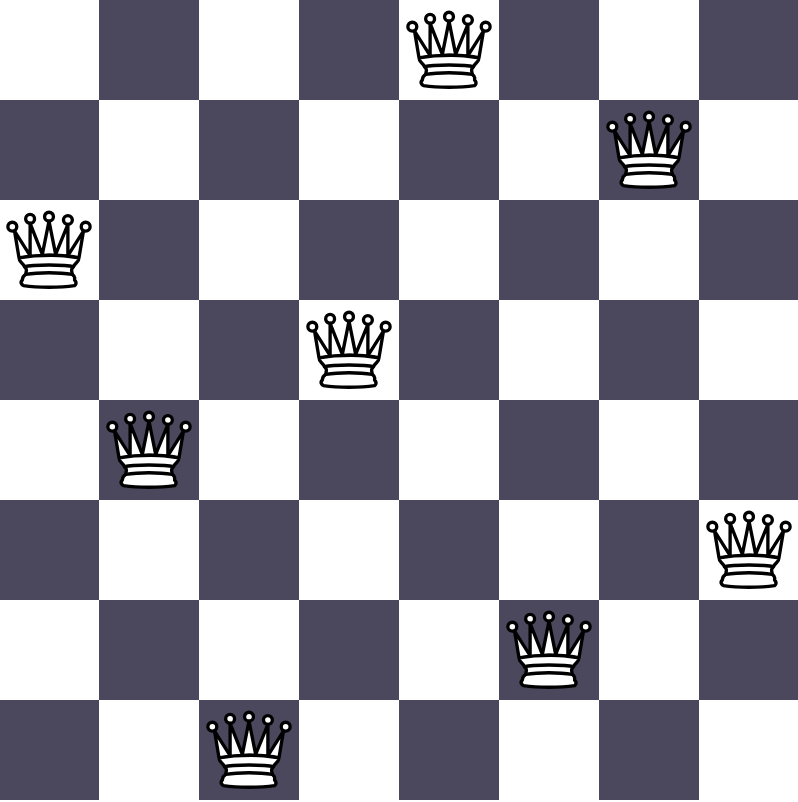
In this section we describe step by step how to create an embedding. We illustrate the process by creating an embedding for the N-Queens Completion Problem.
The aml.amldl package provides all the functions needed to build an embedding.
For the N-Queens Completion Problem we use the following functions:
Descriptor: object that represents the embedding. It works as a Python context manager. AML-DL functions only work within such context.
ADD: commit a duple to the embedding.
APP: append an element to the end of a vector.
C: create a constants.
V: create an empty vector.
CV: create a vector of constants.
INC: create positive duple (inclusion).
EXC: create negative duple (exclusion).
F: find (by name or by position in a vector).
M: merge constants.
R: remove constant.
S: create set from vector.
T: tensorial operations, it allows for compact for-like loops.
1.1. Structure
Embeddings contain two main sections: the definition of constants and the definition of duples.
Let’s start with the definition of constants. These constants form the alphabet that we can use to describe our problem. The concepts they describe can be straightforward, e.g. there is a queen in cell (3,4). Or more abstract, such as being a solution board or a column that has at least one queen. Combining these simple concepts we can build more complex ideas, for instance, a full board could be defined as the set of constants representing the positions of queens and empty cells.
The second part of the embedding is the definition of duples. Duples allow us to establish relations between those complex idea that we can build with constants. For instance, we can build a board as described above and also the concept of being a solution, with those two ideas we can build a positive relation that certain arrangement of pieces and empty cells conform a solution. Likewise, we can build the concept of a rule, for instance constructing a duple for two queens on the same row not being a correct solution.
Additionally, we can add some preprocessing before returning the embedding. In the example below, we return just the duples and constants definitions, without returning the whole embedding object, the Descriptor.
# Algebraic AI - Copyright - All Rights Reserved

from aml.amldl import ADD, APP, C, CV, Descriptor, EXC, F, INC, M, R, T, V, S

boardDim = 8

def embedding(args):

    def ix(x, y):
        return x + y * boardDim

    with Descriptor() as theEmbedding:

        # -- Define constants

        # -- Define duples

        # -- Prepare output

        return
Since vectors are one-dimensional in AML-DL, we make use of an auxiliary function to transform coordinates. This is just used for readability.
1.2. Defining Constants
Constants are defined using the C command.
Vectors are used to organise related constants.
And the CV command serves as a shortcut to create families of constants in the form of vectors.
# Vector of Queens at (i,j) [Flatten 2D matrix]
CV("Q", boardDim * boardDim)
# Vector of Empty cell at (i,j) [Flatten 2D matrix]
CV("E", boardDim * boardDim)
# Vector of Rows. Row(i) indicates that there's at least one Q in row i.
CV("R", boardDim)
# Vector of Columns. Columns(j) indicates that there's at least one Q in column j.
CV("C", boardDim)
# A complete board, one that is a solution to the problem
C("B")

# Set with all possible options
QE = M("Q", "E")

# Create a list of vectors with all Q's or E's for a certain coordinate
# E.g. Q(x=, ) = [Vx=0, Vx=1, ...]
#   where Vx=0 = [Q(0,0), Q(0,1), Q(0,2), ...]
V("Q(x=, )")
V("Q( ,y=)")
V("E(x=, )")
V("E( ,y=)")
for _ in range(0, boardDim):
    APP(F("Q(x=, )"), V())
    APP(F("Q( ,y=)"), V())
    APP(F("E(x=, )"), V())
    APP(F("E( ,y=)"), V())
for x in range(0, boardDim):
    for y in range(0, boardDim):
        APP(F("Q(x=, )", x), F("Q", ix(x, y)))
        APP(F("Q( ,y=)", y), F("Q", ix(x, y)))
        APP(F("E(x=, )", x), F("E", ix(x, y)))
        APP(F("E( ,y=)", y), F("E", ix(x, y)))
1.3. Defining Duples
The INC and EXC commands are used to create duples.
These duples then need to be added to the embedding using the ADD command.
_i = 1  # Axis used by T. Use same index if they run over the same axis.

# Create regions as we add duples to the embedding
theEmbedding.REGION = 1  # --------------------------------------------------

# {R(i), C(j)} < Q(i,j)
# Having a Q at (i,j) implies R(j) and C(i)
for x in range(0, boardDim):
    for y in range(0, boardDim):
        ADD(INC(M(F("R", x), F("C", y)), F("Q", ix(x, y))))

theEmbedding.REGION = 1
# R(i) !< {Qx!=i, E}
# R(x) can only be produced by queens in the row x
ADD(EXC(T("R", _i), M(R("Q(x=, )", T("Q(x=, )", _i)), "E")))

theEmbedding.REGION = 2
# C(j) !< {Qy!=j, E}
# C(y) can only be produced by queens in the column y
ADD(EXC(T("C", _i), M(R("Q( ,y=)", T("Q( ,y=)", _i)), "E")))

# If all cells but one are Empty (in a row or column), then the missing one must be a Queen in the solution board B
# Qxy < {Ex0, Ex1, ... Ex(y-1), Ex(y+1), ...}
theEmbedding.REGION = 5
for x in range(0, boardDim):
    for y in range(0, boardDim):
        Qxy = F("Q", ix(x, y))
        Ex = F("E(x=, )", x)
        Ey = F("E( ,y=)", y)
        ADD(INC(Qxy, M(R(Ex, F(Ex, y)), "B")))
        ADD(INC(Qxy, M(R(Ey, F(Ey, x)), "B")))

# If there is a Queen at (x,y), every other cell in the same column and row must be Empty in the solution board B
# {Ex0, Ex1, ... Ex(y-1), Ex(y+1), ...} < {Qxy, B}
# {E0y, E1y, ... E(x-1)y, E(x+1)y, ...} < {Qxy, B}
theEmbedding.REGION = 6
for x in range(0, boardDim):
    for y in range(0, boardDim):
        Qxy = F("Q", ix(x, y))
        Ex = F("E(x=, )", x)
        Ey = F("E( ,y=)", y)
        ADD(INC(S(R(Ex, F(Ex, y))), M(Qxy, "B")))
        ADD(INC(S(R(Ey, F(Ey, x))), M(Qxy, "B")))

# Q produce empty diagonals
# E.g. {E(0,1), E(1,2), E(3,4), ...} < Q(2,3)
#      {E(0,5), E(1,4), E(3,2), ...} < Q(2,3)
theEmbedding.REGION = 7

for x in range(0, boardDim):
    for y in range(0, boardDim):
        diags = []
        for xx in range(0, boardDim):
            for yy in range(0, boardDim):
                if (x != xx) and (y != yy):
                    if (x - xx) == (y - yy):
                        Exxyyy = F("E", ix(xx, yy))
                        diags.append(Exxyyy)
        Qxy = F("Q", ix(x, y))
        if diags:
            ADD(INC(M(*diags), M(Qxy, "B")))

for x in range(0, boardDim):
    for y in range(0, boardDim):
        diags = []
        for xx in range(0, boardDim):
            for yy in range(0, boardDim):
                if (x != xx) and (y != yy):
                    if (x - xx) == -(y - yy):
                        Exxyyy = F("E", ix(xx, yy))
                        diags.append(Exxyyy)
        Qxy = F("Q", ix(x, y))
        if diags:
            ADD(INC(M(*diags), M(Qxy, "B")))

# Set some Queens as boundary conditions
theEmbedding.REGION = 9
if boardDim == 5:
    # Set a Queen at the center cell
    ADD(INC(F("Q", ix(2, 2)), "B"))

if boardDim == 8:
    # Set two Queens at correct positions
    ADD(INC(M(F("Q", ix(1, 4)), F("Q", ix(3, 3))), "B"))

# Both, empty and queen are not allowed in the solution board
# Q(x,y) !< {E(x,y), B} for all (x,y)
theEmbedding.REGION = 11
ADD(EXC(M(T("Q", _i), T("E", _i)), "B"))

# Require all columns and all rows with a queen
# {R1, R2, ..., C1, C2...} < B
theEmbedding.REGION = 12
ADD(INC("R", "B"))
ADD(INC("C", "B"))
The T command can be complex to use and it can generally be expanded into a normal loop:
EXC(T("R", _i), M(R("Q(x=, )", T("Q(x=, )", _i)), "E"))

term_left = T("R", _i)
term_right = M(R("Q(x=, )", T("Q(x=, )", _i)), "E")
The term on the left sets a loop over elements in the R term (representing active Rows)
The term on the right combines the result of an R command with the term E (all Empty cells).
The R command removes from the Q(x=,) vector, the term at a certain position pointed by the T operator.
Since both T’s use the same index, they move alongside (as in a one-dimensional loop).
If different indices were to be used, it would result in a double loop.
This translates into the following expression:
EXC(F("R", 0), M(R("Q(x=, )", F("Q(x=, )", 0)), "E"))
EXC(F("R", 1), M(R("Q(x=, )", F("Q(x=, )", 1)), "E"))
EXC(F("R", 2), M(R("Q(x=, )", F("Q(x=, )", 2)), "E"))
...
1.4. Output
Constants, positive duples and negative duples are stored in the global variables “constants pending transfer to algebra”, “inclusions” and “exclusions”, respectively.
constantNames = [el.key for el in F("constants pending transfer to algebra").r]
p = F("inclusions").r
n = F("exclusions").r

return constantNames, p, n